How can we balance input efficiency and privacy/security on Android?
The keyboard, as the most frequently used input method on a mobile phone, records every word and habit of the user. However, most mainstream keyboards (such as Gboard) rely on cloud processing for intelligent error correction and dictionary learning, meaning your input data may unknowingly leave the device. If you are looking for an open-source alternative that provides a modern input experience without compromising privacy,Urik It's an option worth trying.
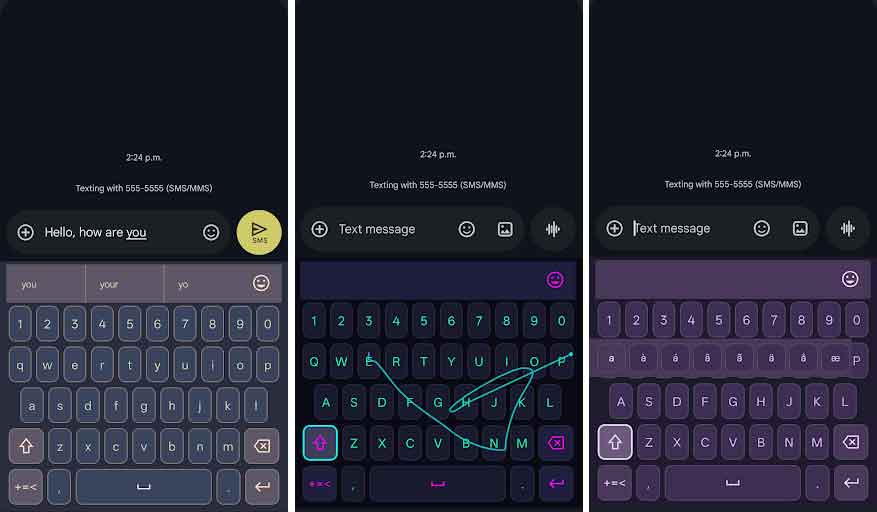
Urik: Keeping data boundaries within the device
Urik is an Android keyboard that places equal emphasis on usability and privacy. Its core logic is very simple: All processing is done locally. Whether it's typing correction or vocabulary learning, the data never leaves the phone. To prevent unauthorized access to local data, Urik uses an SQLCipher encrypted database to store user dictionaries and learning content, eliminating the risk of plaintext data being stored on disk from the outset.
This project is completely open source and community-funded, and does not report metrics to investors, only to users. Urik is currently in public beta testing and aims to be an auditable and trustworthy open-source alternative to Gboard.
Features: Privacy protection without sacrificing user experience
Prioritizing privacy doesn't mean rudimentary functionality. Urik provides a wealth of input enhancement features while ensuring no network access or telemetry analysis is required:
- Efficient Input: It supports both tap input and gesture swipe input to meet the typing habits of different scenarios.
- Intelligent error correction: Local spell checking is implemented based on SymSpell; the error correction logic has been optimized to automatically skip URLs and email addresses, avoiding excessive intervention that could lead to incorrect changes.
- Highly customizable: Users can customize button size, vibration feedback, and input behavior, and the system supports multiple theme switching and a favorites function.
- Multilingualism and Accessibility: It offers multilingual support and corresponding character variations; strictly adheres to the WCAG AA contrast standard; and fully supports TalkBack screen reader.
Applicable scenarios and target audience
- Privacy Geek: Users who want to completely sever the connection between their input method and the server to prevent data leaks.
- Open source advocates: They tend to use tools with auditable code and collaborative development capabilities.
- Special needs users: Groups that require a high-contrast visual interface or strong accessibility support.
- Gboard Migrants: Looking for functionally comparable but lighter and more secure alternatives.
Installation and Deployment
System requirements: Android 8.0 or later (API 26+)
Acquisition channels:
- Official channels: Joined Google Play's open beta testing.
- Official website: Urik.io
- Source code: GitHub repository
- Quick Download: Quark Drive
Developer Guide: Building from Source Code
If you wish to compile Urik yourself, please ensure your development environment meets the following requirements:Android Studio Ladybug+, JDK 17+, and Android SDK 34+To build the Debug version, execute the following command:
git clone https://github.com/urikdev/Urik.git cd Urik ./gradlew assembleDebug summary
In today's era where "data is an asset," a keyboard that doesn't require network permissions, doesn't perform telemetry analysis, and is locally encrypted is particularly rare. Urik demonstrates that privacy protection and a smooth typing experience are not mutually exclusive by bringing intelligent capabilities to the device itself.
