Volume management in macOS has always been a pain point. Many users have experienced this dilemma: in a Zoom meeting, they turned up the system volume because the other party's voice was too low, and then Spotify suddenly cut to a rock song in the background. The loud sound was an "eardrum killer".
Compared with the "volume synthesizer" that has long been popular in Windows, Mac's global volume control is too simple and crude. While SoundSource offers a perfect solution, the price tag gives many people pause. Today I recommend an open source and free alternative—— finetune, it will be professional Mixer Features are integrated directly into your menu bar.
🎯Applicable scenarios: Video creators who frequently participate in remote meetings and require fine control of audio, as well as hardware enthusiasts with multiple audio output devices.
Core Features: Turn your Mac into a professional mixing console
FineTune is essentially a lightweight System-Level DSP (Digital Signal Processing) Tools. Simply put, it installs an independent "virtual volume knob" for each application on your Mac, completely breaking the one-size-fits-all model of global volume.
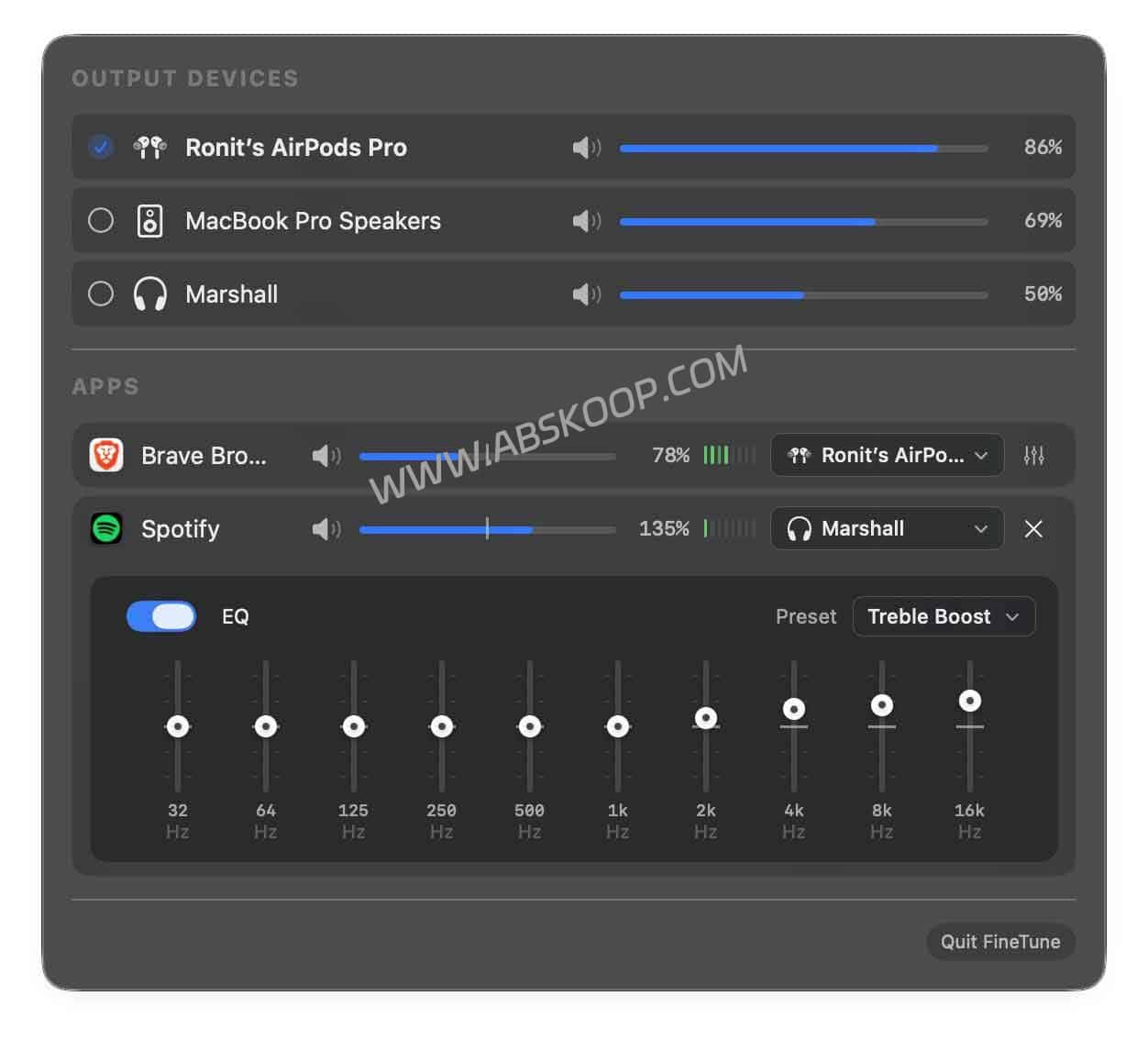
1. Application independent volume control (Per-App Volume)
Like a professional mixer, you can assign different volume weights to different software to avoid sound conflicts:
- Collaboration software (such as Slack / DingTalk): Turn it up to 10% to ensure notifications are received but don't interfere with concentration.
- Music software (such as Spotify/Apple Music): Set to 60% for comfortable background white noise.
- Meeting software (such as Zoom/Tencent Meeting): Maximize to 100% to ensure every communication detail is captured.
2. Software gain and EQ equalizer
Facing online classes or old movies whose recording level is too low, you still can’t hear clearly even if the system volume is turned to the maximum? Provided by FineTune Software gain (Gain) Amplifies sound by up to 400%. In addition, the built-in 10-band EQ equalizer allows users to load different presets based on hardware (such as MacBook’s built-in speakers or AirPods), significantly optimizing the listening experience.
Software gain is achieved through signal amplification. If using MacBook built-in speakers, be careful to use gain above 100% to avoid physical damage. Recommended to only be turned on when wearing headphones or connecting external speakers"High-magnification software gain".
3. Flexible audio routing (Audio Routing)
FineTune democratizes routing functionality previously only found in professional DAW software, allowing you to specify where sounds from different apps go:
- Practical applications: You can let the sound of the music app be played to the whole house through Bluetooth speakers, and at the same time, the sound of the conference app can be directed to the wired headphones. The two will not interfere with each other, achieving true parallel audio management.
Installation and Deployment Guide
FineTune is completely open source and has no in-app purchases or subscription restrictions.
Solution A: Homebrew installation (recommended for geeks)
The installation can be completed with one line of code through the terminal, and the deployment process is efficient and pure:
brew install --cask finetuneOption B: Manual installation (general method)
Visit the GitHub repository to download the latest .dmg To install the package, drag it into the Applications folder. If there is no response when starting for the first time, please refer to the permission configuration below.
Troubleshooting
Because FineTune needs to call the underlying macOS Core Audio Permissions, please pay attention to the following two points when configuring for the first time:
Q1: There is no response when adjusting the volume after installation?
solve: Permission must be granted. Please go to System settings $rightarrow$ Privacy and security $rightarrow$ Audio Capture, turn on FineTune. Otherwise the software will not be able to intercept and process the audio stream.
Q2: Why can’t I find an app in the list?
solve: To optimize resource usage, FineTune only displays "Speaking" application. If an app is paused it may disappear temporarily, just click play and the app will automatically reappear in the list.
Project resources and requirements
🔗 Quick links
- Project homepage: GitHub – finetune Project
- System requirements: macOS 14.0 (Sonoma) and above
Excellent system tools should be "invisible". FineTune usually sits quietly in the menu bar, providing powerful control only when needed, completing the last piece of the audio management puzzle for Mac users.
