For content creators, the most time-consuming part is often not the creation process, but the "dehydration" of massive amounts of raw material. Faced with an hour of material, only 10 minutes may be effective content, with the rest of the time occupied by long silences, meaningless pauses, and repetitive segments.
Traditional methods either rely on intensive manual editing or expensive SaaS subscriptions. Now, by building a private, automated workflow locally, you can completely eliminate your dependence on paid cloud services.
Recently, a project based on [previous project name] appeared on GitHub. Claude Code An open-source solution. It upgrades traditional scripts to...Semantic Clipping AgentIt can not only perform data cleaning efficiently, but also continuously optimize the editing logic through feedback loops.
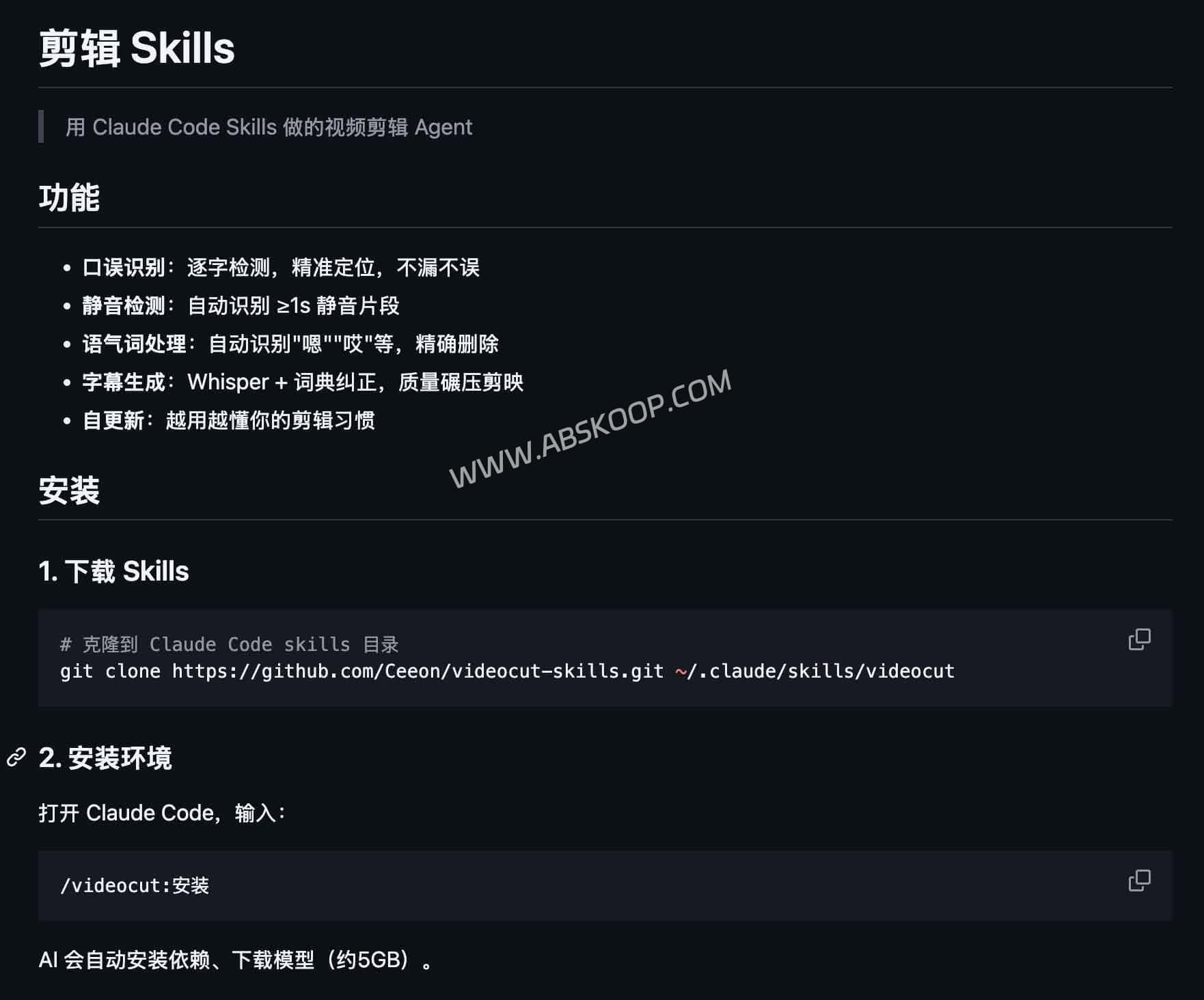
Core technological advantages: From "waveform processing" to "semantic understanding"
Most commercial editing tools rely on audio waveforms (dB threshold) to determine silence. This mechanical segmentation is prone to accidentally deleting natural breathing points, resulting in a harsh sound in the final cut. This open-source solution represents a technological leap, and its core advantages are reflected in:
- Semantic-level precise segmentationBy invoking the FunASR model, the system is able to "understand" the content rather than simply monitoring decibels. It can accurately identify slips of the tongue and retain pauses that conform to the logic of natural language.
- Industrial-grade transcription accuracyBuilt-in OpenAI Whisper large-v3 The model, as the top speech recognition model in the open-source community, has a significantly higher accuracy rate than most commercial software.
- Privacy protection and zero costAll computing power runs locally, eliminating the need to upload private materials to the cloud, thus avoiding the risk of data leakage and eliminating the ongoing expenses of SaaS subscriptions.
💡 Tech Insights: The underlying logic of many commercial "one-click" video editing tools is essentially a wrapper around these open-source models. Mastering local deployment solutions means you have core control over productivity.
Deployment Guide: Quickly Set Up a Local Environment
This agent uses a highly standardized encapsulation, and as long as your terminal has a Claude Code environment configured, deployment can be completed in the following two steps:
1. Load functional components (Skills)
Run the following command in the terminal to mount an extension component specifically for handling video streams in the Claude environment:
git clone https://github.com/Ceeon/videocut-skills.git ~/.claude/skills/videocut2. Initialization Configuration
Enter the Claude Code interface and input the command:/videocut: Install
The system will automatically configure dependencies and download approximately 5GB of model weight files (including FunASR and Whisper).
⚠️ Important Notes: Due to the large size of the model file, please ensure that the installation is performed under stable network conditions. Once deployed, this tool will support fully offline operation.
Practical SOP: Instructional Automated Workflow
Once the environment is set up, no complex GUI operations are required; the entire editing process can be driven by natural language commands.
- Preprocessing and Analysis $rightarrow$ input
/videocut: Video cutThe agent transcribes the video stream and tags long silences ($ge 1 second) and interjections. The system generates a..."Review Log" For manual verification, rather than directly overwriting the original. - Execute batch processing $rightarrow$ input
/videocut: EditingThe background calls FFmpeg to accurately remove all marked invalid segments. - High-precision subtitle burning $rightarrow$ input
/videocut: SubtitlesUse Whisper large-v3 to generate a timeline and call the local dictionary to automatically proofread proper nouns (e.g., correct “ChatGPT” to “ChatGPT”). - Logical Iterative Optimization $rightarrow$ input
/videocut: Self-updatingDefine your editing preferences using natural language. The agent will write the rules into the configuration and execute them automatically in subsequent tasks.
Resource Links
- Open source repositories: GitHub – videocut-skills
summary
The tool itself is not a competitive barrier; the real efficiency improvement lies in encapsulating it into reusable workflows. For professional users who want to reduce marginal costs and free up cognitive bandwidth, such automation tools with "self-iteration" capabilities have extremely high deployment value.
It is recommended to first conduct gray-scale testing in low-risk short video scenarios, and then expand it to core business processes after the entire process is successfully tested.
