twitter-to-bsky:实现 Twitter/X 内容一键同步至 Bluesky 与 Mastodon
twitter-to-bsky 是一款轻量级的浏览器脚本(Userscript),旨在帮助用户在 Twitter/X 网页端发布推文时,同步将内容推送至去中心化社交平台 Bluesky and Mastodon。该工具无需安装独立软件,仅需在 Chrome、Firefox or Edge 浏览器中安装脚本管理器即可运行。
适用场景与限制
在社交平台迁移的过渡期,通过脚本同步内容可以有效维持多平台活跃度,防止粉丝失联。该工具最适合分发 新闻、博客链接及通用状态更新。
注意:由于平台机制差异,该脚本 不适用于 私信、回复或 @ 提及等强互动内容。此外,Bluesky 目前暂不支持同步视频与 GIF 格式。
支持同步的内容类型:
- 纯文本推文
- 单图或多图推文
- 带有链接预览卡的推文
安装与配置步骤
- 安装脚本管理器:在浏览器中安装 Tampermonkey or Violentmonkey 插件。
- 加载同步脚本:访问 twitter-to-bsky.user.js 并确认安装。
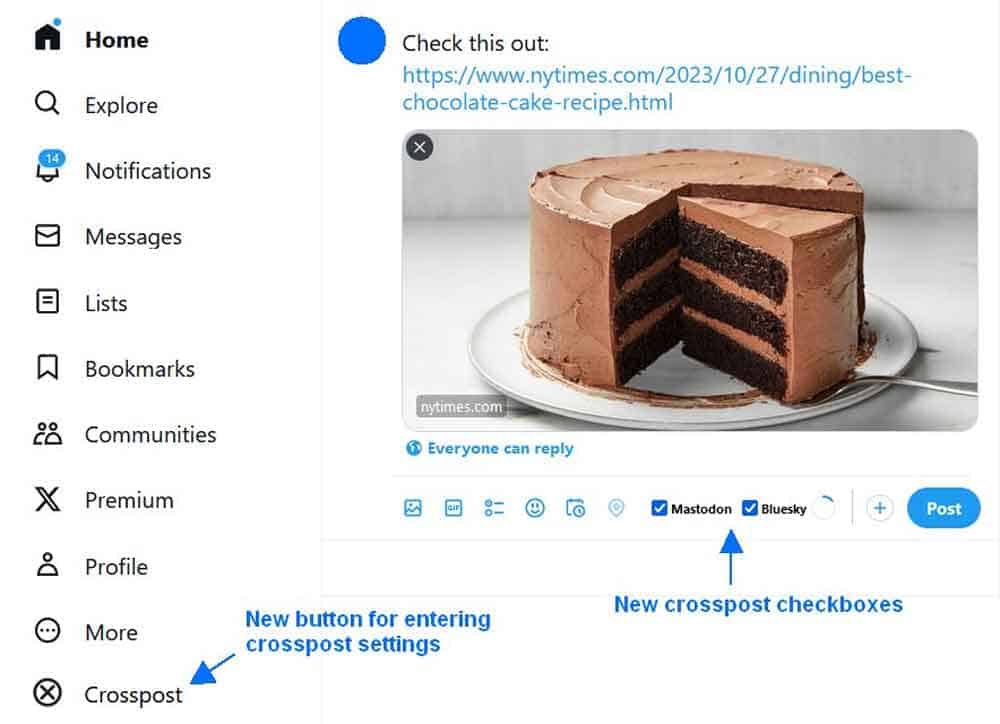
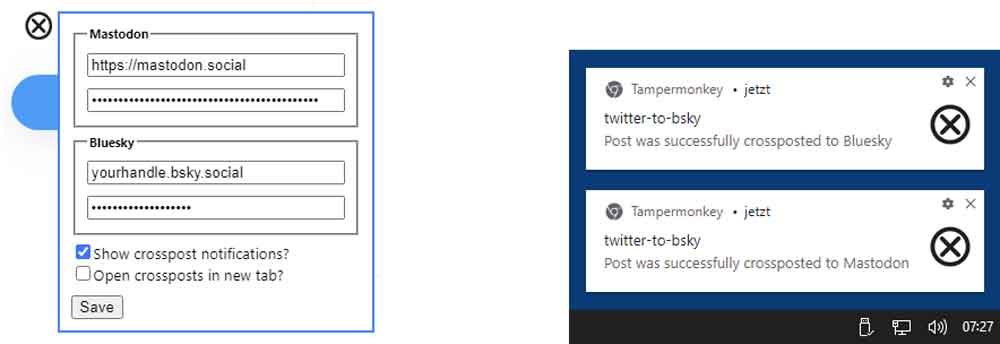
- 配置平台权限:安装完成后,Twitter 网页导航栏将出现 「交叉发布」 按钮,点击进入设置界面填写以下信息:
- Mastodon 配置:填写实例地址(如
https://mastodon.social)及 Access Token(路径:设置 $rightarrow$ Development $rightarrow$ 创建新应用)。 - Bluesky 配置:Fill in the complete account Handle (e.g.)
@example.bsky.social)及 App 密码(路径:设置 $rightarrow$ 高级 $rightarrow$ App Passwords)。
- Mastodon 配置:填写实例地址(如
- 开始同步:在推文编辑器中勾选 「Mastodon」 or 「Bluesky」 选项,点击发布即可同步至对应平台。
兼容性建议
经测试,Chrome + Violentmonkey 的组合运行最为稳定。对于 Firefox 用户,由于浏览器内容安全策略(CSP)的限制,使用 Violentmonkey 可能会出现间歇性失效,建议优先选择 Tampermonkey 插件以获得更好的兼容性。
Resource Links
- GitHub 项目页:https://github.com/59de44955ebd/twitter-to-bsky
- 脚本直接安装地址:点击安装
End of text
