When you urgently need to send a video to a client but are told by WeChat that the file is too large; or when trying to send an attachment to Discord or an email but are blocked by the platform's upload limit, you might habitually search for "online video compression".
However, most such tools operate on the principle that you must first upload the video to the other party's server and wait for it to be processed in the cloud before downloading it. This not only wastes upload time, but more importantly, if the video involves internal company information or personal privacy, handing the file over to an unknown third-party server often poses security risks.

Video Compressors It offers a completely different solution: a lightweight web tool that focuses on "local processing." The video compression process is completed entirely within your browser, without uploading the file to the cloud, thus protecting privacy while eliminating lengthy upload wait times.

How does it achieve compression without requiring uploading?
Traditional online compression websites rely on a chain of "client upload $rightarrow$ cloud computing $rightarrow$ client download". Video Compressors, however, adopts a pure front-end approach, utilizing the browser's built-in... WebCodecs API It directly calls local hardware (such as GPU) for encoding and decoding.
This means that when you drag a video into a webpage, the data stream remains on your device and doesn't leave the local environment. However, it's important to note that although the video content isn't uploaded, as a webpage tool, it may still collect basic visitor statistics. Therefore, while it effectively addresses the "material privacy" issue, it's not a complete physical disconnection from the internet.
Quick Start: Compress in Three Steps
The tool has a clean interface with no redundant registration process or mandatory watermarks, and its operation logic is extremely simple:
1. Import video: Drag and drop common video files such as MP4, MOV, and MKV directly into the webpage area.
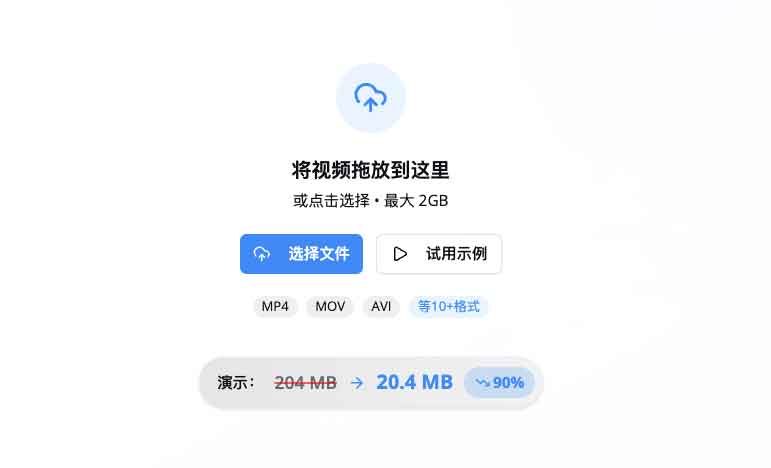
2. Select preset: To make it more convenient for users, it has built-in presets for various scenarios (such as Discord, WeChat, and email) and can match the size limits of each platform with one click; advanced users can also switch to manual mode to customize the resolution and bitrate.
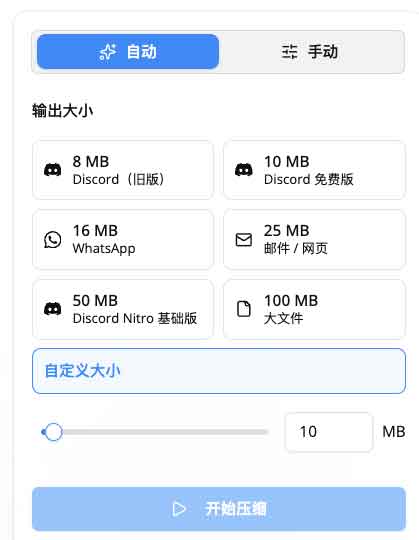
3. Process and save: After clicking "Compress," the browser will utilize local computing power for processing, ultimately outputting an H.264 encoded MP4 file with the highest compatibility.

Compression effect and performance boundary
In practice, a 145MB video can be reduced to 87MB (approximately 40% reduction) under "Basic Compression" mode; if "Extreme Compression" is enabled, it can be reduced to around 29MB (approximately 80% reduction). The actual compression rate depends on the complexity of the original video and your tolerance for image quality.
✅ Applicable Scenarios
- Professionals who need to quickly send short videos to clients/teams
- Users who handle sensitive internal information and do not wish for their data to be leaked.
- For temporary needs, in scenarios where you don't want to install bulky transcoding software.
❌ Not applicable scenarios
- Professional self-media that need to process large amounts of materials in batches
- The requirement is to output in professional formats such as H.265 or ProRes.
- For developers who wish to deploy the system themselves using the source code (currently, the GitHub page is only for introduction).
Precautions
Since all computational load is handled locally, please keep the following points in mind when using it:
- ⚠️ Hardware dependencies: Processing extremely large files (such as 10GB+) consumes a lot of memory and may cause the browser to crash or become unresponsive on older devices or low-spec laptops.
- ⚠️ Format restrictions: Only H.264 MP4 format is supported for output.
- ⚠️ Browser compatibility: It is recommended to use Chrome or Edge for the best WebCodecs API support. Firefox or older versions of Safari may have compatibility issues.
- ⚠️ Single-threaded processing: Batch compression is not currently supported; only a single file can be processed at a time.
Resource Links
🐙 GitHub Page Project official introduction page
Disclaimer: This article describes its "no upload" mechanism based on the official documentation. Actual compression efficiency and stability depend on the user's local hardware configuration and browser version. This site is not responsible for software crashes or data loss caused by insufficient hardware performance.
