Get to know Awesome Claude Skills
Awesome Claude skills It is a curated resource library designed to help users transform Claude from a simple chatbot into a highly efficient automated productivity tool by aggregating high-quality skills, tools, and methodologies.
Its core logic lies in transforming high-frequency tasks into... Reusable workflowWhether you use the Claude.ai web interface, the Claude Code command-line tool, or integrate through the Claude API, this resource can achieve standardized output, ensuring that the AI's execution results meet expectations, rather than relying on random improvisation.
Core concept: What are Claude Skills?
Simply put, Claude Skills is like a tool tailor-made for AI."Task Execution Template"It establishes a standard operating procedure for Claude by pre-setting requirements details, operating rules, boundary conditions, and specific output formats.
By introducing Skills, you can significantly reduce communication costs, eliminate the instability of AI output, and achieve industrial-grade consistency in the delivery of complex tasks.
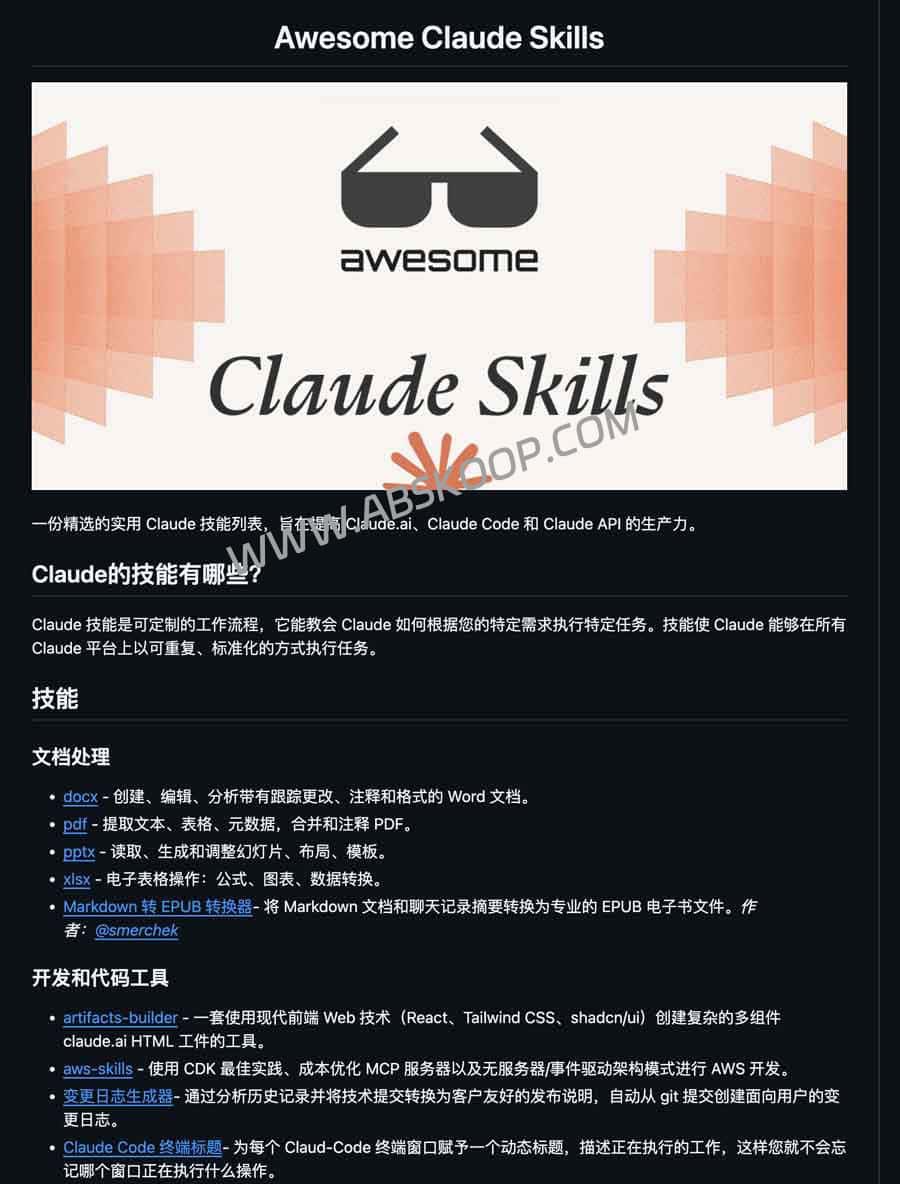
Full-scene skill matrix
This list covers the entire chain from corporate office work to in-depth research and development, and is categorized as follows:
💻 Research and Development and Technology Implementation
- Front-end and Visualization: React/Tailwind component building and D3 data chart generation.
- Backend and Architecture: AWS deployment optimization and Move language code analysis.
- Automation and Testing: Playwright provides automated testing, iOS simulator debugging, and Git commit history generation.
- Advanced Development Flow: Sub-agent concurrent development, code review, and dynamic naming of Claude Code terminals.
📄 Document processing and office automation
- General Documentation: Batch editing and format review of Word documents, optimization of PPT templates, and conversion of Markdown to EPUB.
- Data processing: PDF metadata extraction and merging, Excel formula processing and visualization.
📊 Data Analysis and Business Insights
- Data Analysis: CSV visualization summary, PostgreSQL secure read-only query, error backtracking analysis.
- Marketing: Automatic application of brand guidelines, competitor advertising analysis, domain creative generation and TLD checking, and customer lead identification.
✍️ Content creation and communication
- Writing Enhancement: AI-powered writing structure feedback, idea brainstorming, and precise extraction of web page content.
- In-depth research: It assists in family history research, provides answers to document tracing based on NotebookLM, and analyzes meeting behavior patterns.
🎨 Creative Media and Productivity Tools
- Visual output: PNG/PDF design output, high-definition demo image reproduction, Slack GIF generation, Gemini image API calls.
- Organization and Management: Intelligent invoice classification and renaming, Kaizen continuous improvement analysis, and n8n workflow automation.
🔐 Security, Collaboration, and Systems
- Secure evidence collection: Digital forensics, file metadata extraction, and Sigma rule-based threat detection.
- Project collaboration: Automated Git pushes and automated review of implementation plans and fixes.
Deployment and Invocation Guide
Depending on the usage environment, you can activate the skill in the following three ways:
- Claude.ai (web version): Click 🧩 in the chat interface Skill iconSimply add the required skills to activate them.
- Claude Code (Terminal): Upload the skills catalog to
~/.config/claude-code/skills/It will load automatically after startup. - Claude API (Developers): Specify in request parameters
skillsID. This feature is currently fully supported. Claude 3.5 Sonnet Model.
Suggestions for creating high-quality skills
If you plan to build your own skills, it is recommended to follow these principles:
- Define verifiable scenarios: Ensure that the task objectives are clear, the results are repeatable, and the results are easy to verify.
- Set strict boundaries: Provide specific use cases, clearly telling the AI "what it can do" and "what it absolutely cannot do".
- Written for AI: Instructions should focus on logical guidance and execution paths, rather than simple user instructions.
- Improve robustness: It includes error handling mechanisms, dependency declarations, and cross-platform compatibility testing.
Resource Links
For the complete list, please visit the GitHub open-source repository:
👉 https://github.com/ComposioHQ/awesome-claude-skills
