Mastering Commercial Design Skills with Photoshop and Illustrator from Scratch
To enter the design field, simply mastering software operation is far from enough; the real core lies in transforming tools into business competitiveness. This bootcamp is designed specifically for learners with no prior experience, guiding you through in-depth practical training in two core software programs, Photoshop (PS) and Illustrator (AI), to advance your skills from "software novice" to "commercial designer."
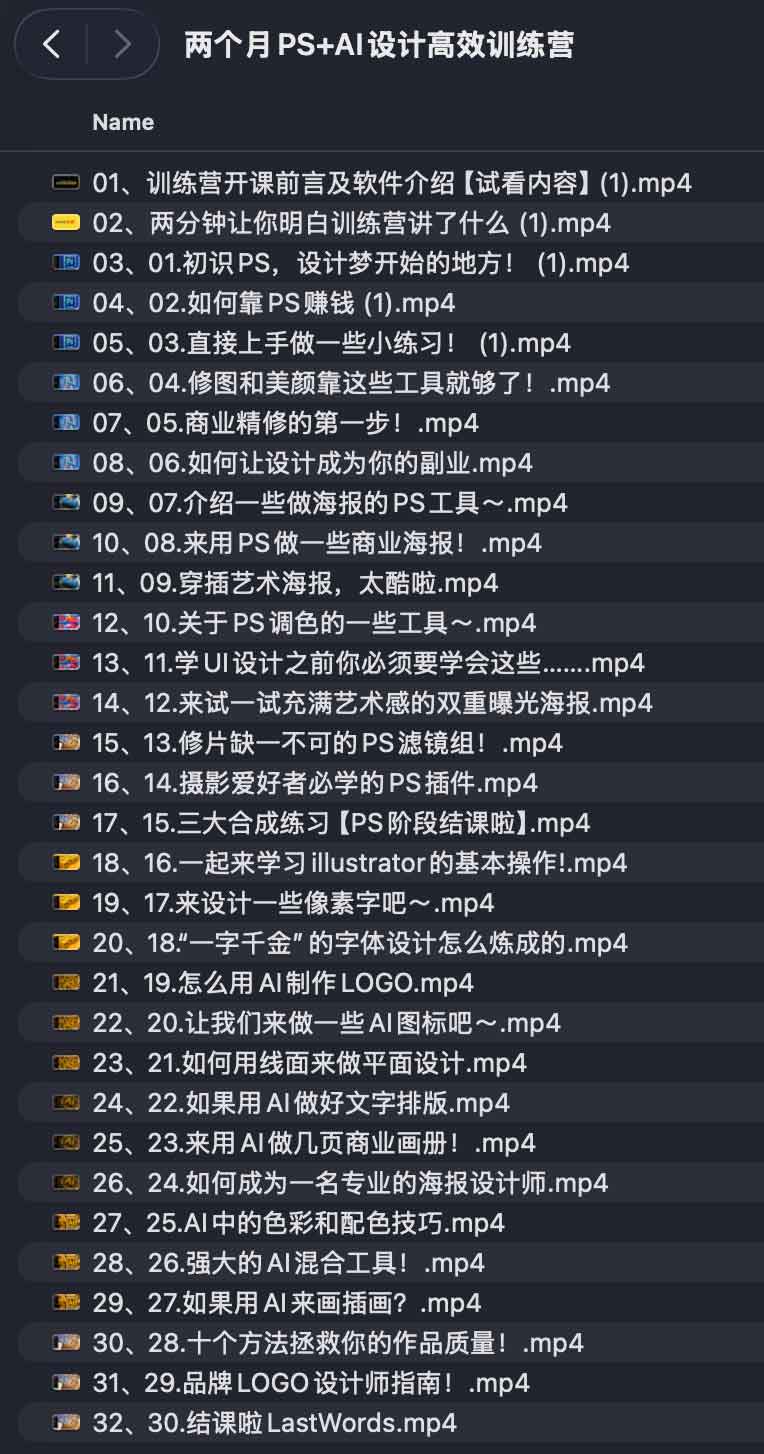
Modular learning path
Phase 1: Visual Retouching and Compositing in Photoshop
The Photoshop section focuses on developing your control over images. This course will guide you beyond simply piling on features and delve into the logic of visual expression.
- Basic Construction: Quickly familiarize yourself with the software interface and master the operation logic of the core tools.
- Image processing: It covers professional beautification, fine retouching and filter applications to create high-quality visual effects.
- Business Practice: Practice the composition and color matching of commercial posters, and learn the complete workflow from the first draft to the final revision.
- Advanced abilities: Master layer management, color fundamentals, and various efficient plugins. Enhance your visual imagination through hands-on exercises such as double exposure and artistic compositing.
Phase Two: Illustrator Vector Graphics and Brand Building
The AI section focuses on building a professional and scalable visual language to lay the foundation for brand design:
- Vector basics: Proficient in using path management and basic AI tools.
- Brand elements: Learn the process of logo creation, icon design, and pixel font development.
- Typography Aesthetics: In-depth study of color matching, typography, and practical design techniques for commercial brochures.
- Creative expression: Utilize advanced features such as AI-powered hybrid tools to create high-quality illustrations.
From design skills to commercialization
This course not only teaches technical skills, but also incorporates "how to make money from design" into its curriculum, helping students turn their interests into real income.
- Portfolio polishing: It provides references for works in various styles and guides you on how to build a competitive personal portfolio.
- Order taking practice: This analysis examines mainstream order-taking platforms and shares strategies for securing commercial poster and logo design projects.
- Brand Operation: It explains the methods for building a personal design brand and the logic of reasonable commercial pricing.
Applicable Scenarios
- Career Advancement: For students with no prior experience or working professionals who want to quickly develop design skills.
- Side Hustle Exploration: The plan is to take on commercial design orders using Photoshop/Illustrator to monetize part-time work.
- Business empowerment: E-commerce operators, self-media bloggers, or brand practitioners can improve the quality of their visual output.
- Career transition: A freelancer aspiring to become a professional visual designer.
How to obtain the course
Two-month Photoshop + Illustrator design intensive training camp learning address: Click to enter Quark Cloud Drive
