Notion Life Management System Construction Solution: From Basic Configuration to Advanced Workflow Practical Guide

99Second reading
no comments

构建全能数字工作台:Notion 从入门到精通

Notion 并非简单的笔记工具,而是一个可高度自定义的信息整合与项目管理平台。本课程通过 80 余节高质量视频及配套 PDF 讲义,带你从零开始,逐步掌握从基础排版到复杂数据库搭建的完整链路,最终实现 AI 增强的个人知识管理系统。
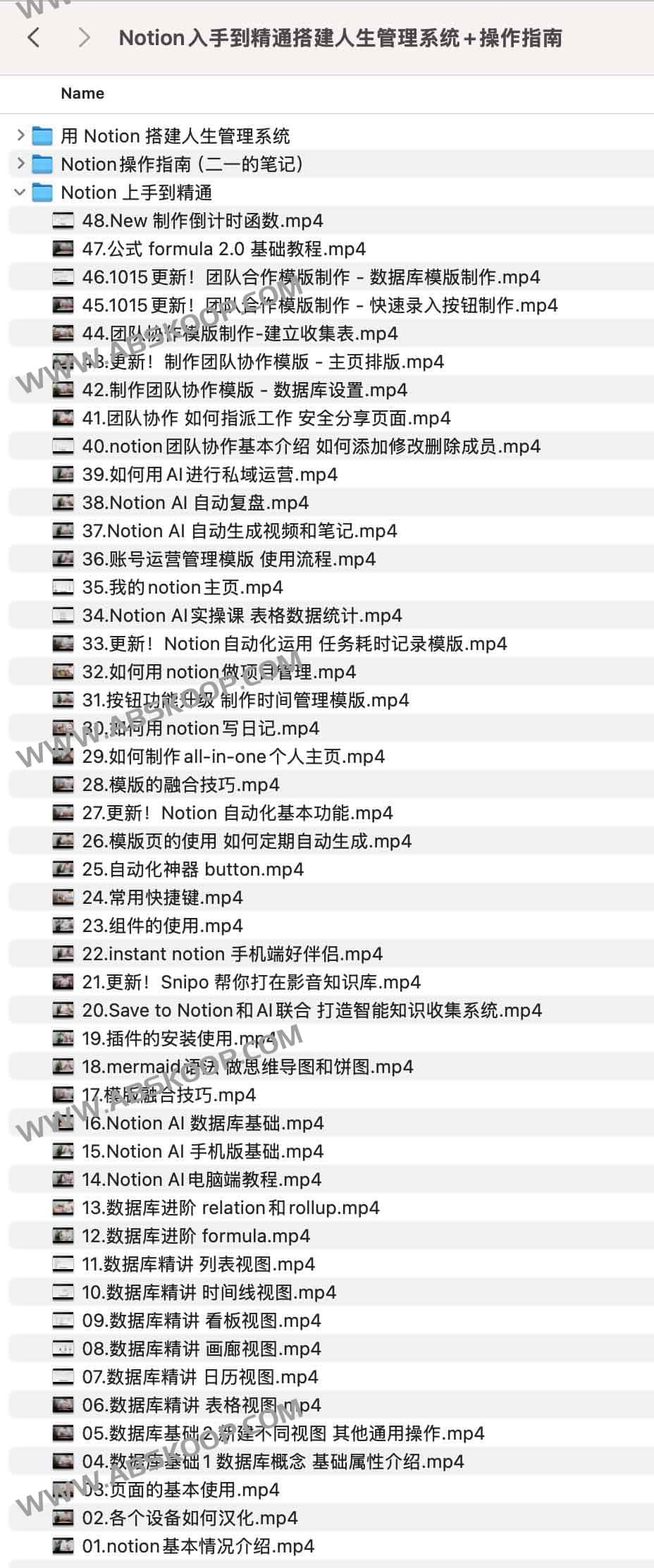
Notion 人生管理系统构建方案:从基础配置到高级工作流实操指南

核心学习模块

1. Quick Start and Basic Operations

针对新手设计的入门指南,涵盖界面汉化、基础快捷键及页面属性配置。通过“视频演示 + 模板实践”的模式,帮助用户迅速跨越学习曲线,快速上手页面编辑。

2. 数据库逻辑深度解析

详细拆解 Notion 的核心——数据库。课程将逐一讲解 表格、日历、画廊、看板、时间线、列表 六大视图,并深入探讨 Formula 公式、Relation(关联)与 Rollup(汇总) 等高阶字段,助你构建专业级的工作流。

3. AI 实战与自动化采集

探索 Notion AI 的落地场景,包括文本自动生成、数据总结、智能复盘及视频内容归纳。同时结合 Save to Notion 等第三方插件,打造高效的智能知识采集链路。

4. 个人管理系统搭建

基于 Life OKR 理念,指导用户构建一套从“目标设定”到“周期复盘”的完整闭环。课程提供可直接套用的模板,将理论转化为可运行的「人生管理系统」。

Applicable scenarios and target audience

  • 知识工作者: 需要统一管理碎片化信息、构建数字大脑的用户。
  • 项目管理者 / 自由职业者: 寻求高效的任务追踪、进度管理与内容创作方案。
  • 自媒体 / 创作者: 需要规划内容日历、管理素材库的从业者。
  • 工具爱好者: 希望通过 AI 自动化提升信息整合效率的极客。

学习成果

  • Comprehensive understanding: 彻底理解 Notion 的功能模块与底层逻辑。
  • 系统化搭建: 能够独立构建项目管理、时间复盘等定制化系统。
  • AI 赋能: 熟练运用 AI 实现内容快速生成与知识自动化整理。
  • 效率升级: 拥有一套可生长、可迭代的个人操作系统。

资源获取方式

课程名称: Notion 入手到精通搭建人生管理系统 + 操作指南

获取地址: Click to go to Quark Cloud Drive

End of text
0
Administrator
Copyright Notice:This article is original content from this website. Administrator 于2025-12-12发表,共计792字。
Reprinting Notice:Unless otherwise stated, all original content on this site is published under the Creative Commons Attribution 4.0 (CC BY 4.0) license. Please indicate the source and retain the original link when reprinting. Some content on this site is compiled from publicly available information and may have been generated or optimized with the assistance of AI technology. It is for reference only and does not constitute any professional advice. Readers should make their own judgments and verifications. This site assumes no responsibility for the availability, security, or legality of third-party resources.
Comments (No comments)
验证码