Want to make short videos, but stuck on "uncreative editing" or "too inefficient"?
Many creators, when faced with CapCut, often only manage simple splicing and cropping, struggling to achieve stunning transitions, effects, or sophisticated visuals. How can watermarks be quickly removed from complex footage? How can cinematic subtitles be created? And how can editing optimizations be used to circumvent platform deduplication mechanisms?
To address these pain points, this "Advanced CapCut Course" will take you from zero to expert, transforming your editing skills into real-world competitive advantage through systematic, hands-on teaching.
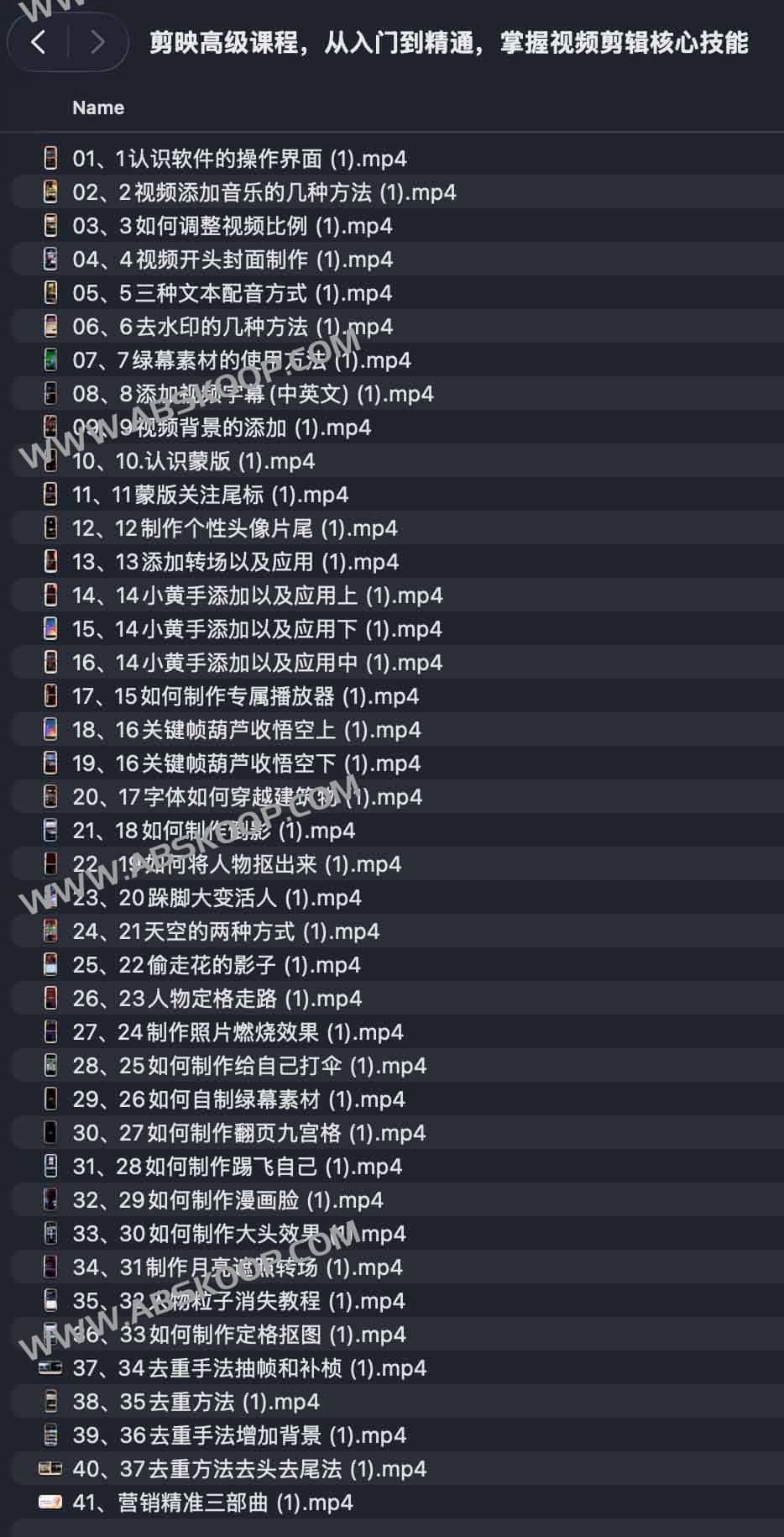
📚 Core Course Modules
1. Quick Start Guide: Basics and Interface
- Comprehensive Interface Analysis: Quickly familiarize yourself with the software layout and eliminate operational confusion.
- Basic configuration: Master video aspect ratio settings, cover creation, and precise addition of sound effects/music.
2. Text and Sound: Enhancing the Audiovisual Experience
- Voiceover proposal: This article details three efficient methods for voice-over implementation.
- Advanced Subtitles: Quickly add Chinese and English subtitles, and play with font transitions and dynamic effects.
3. Visual processing: Watermark removal and green screen application
- Material purification: Learn various practical watermark removal techniques.
- Green screen applications: Master the use of green screen materials and learn how to create your own green screen content.
4. Creative Special Effects: Creating Visual Memorability
- Transitions and Masks: Design smooth transitions and create personalized end credits and logos.
- Creative Visuals: Applications include particle disappearance, reflections, moon occlusion, and the "little yellow hand" animation.
5. Advanced gameplay: Enhanced visual impact
- Character processing: Precise image cutout techniques.
- Fun special effects: It includes visual gameplay such as photo burning, frozen walking, flip-page nine-grid, cartoon face, and big head sticker.
6. Algorithm Optimization: Video Deduplication and Enhancement
- Technical optimization: Optimize the video by using techniques such as frame extraction, frame interpolation, adding background, and cropping the beginning and end.
7. Business Closed Loop: Positioning and Monetization
- The Precision Trilogy: In-depth analysis of how short videos can achieve precise positioning, efficient traffic generation, and commercial monetization.
Applicable Scenarios
- Platform Operations: Daily content updates on platforms such as Douyin, Xiaohongshu, and Kuaishou.
- Career Advancement: Individuals preparing to engage in short video editing or looking for side hustle opportunities.
- Brand promotion: Self-media or corporate teams that need to quickly produce high-quality promotional videos.
- Interest Enhancement: For enthusiasts who want to break through editing bottlenecks and improve their creative expression skills.
Learning benefits
- Full process control: It can independently complete the entire closed loop from material import to finished product output.
- Diverse styles: Proficient in using mainstream short video styles and mastering various advanced special effects techniques.
- Efficiency doubled: The operation path has been optimized to significantly improve the output speed while maintaining visual appeal.
- Business empowerment: Transform editing skills into the ability to gain followers and enhance the commercial value of content.
How to obtain the course
Click the link below to access the learning: Quark Cloud Drive Download
End of text
