WX Channel Downloader:微信视频号本地下载与管理工具
WX Channel Downloader(微信视频号下载助手) 是一款专为个人与团队设计的视频备份工具。它通过在本地构建 HTTP 代理服务器,拦截微信浏览器与视频号页面的流量并动态注入脚本,从而实现视频信息的快速采集与本地化保存。该工具主打“零配置”体验,极大地降低了批量管理视频内容的门槛。
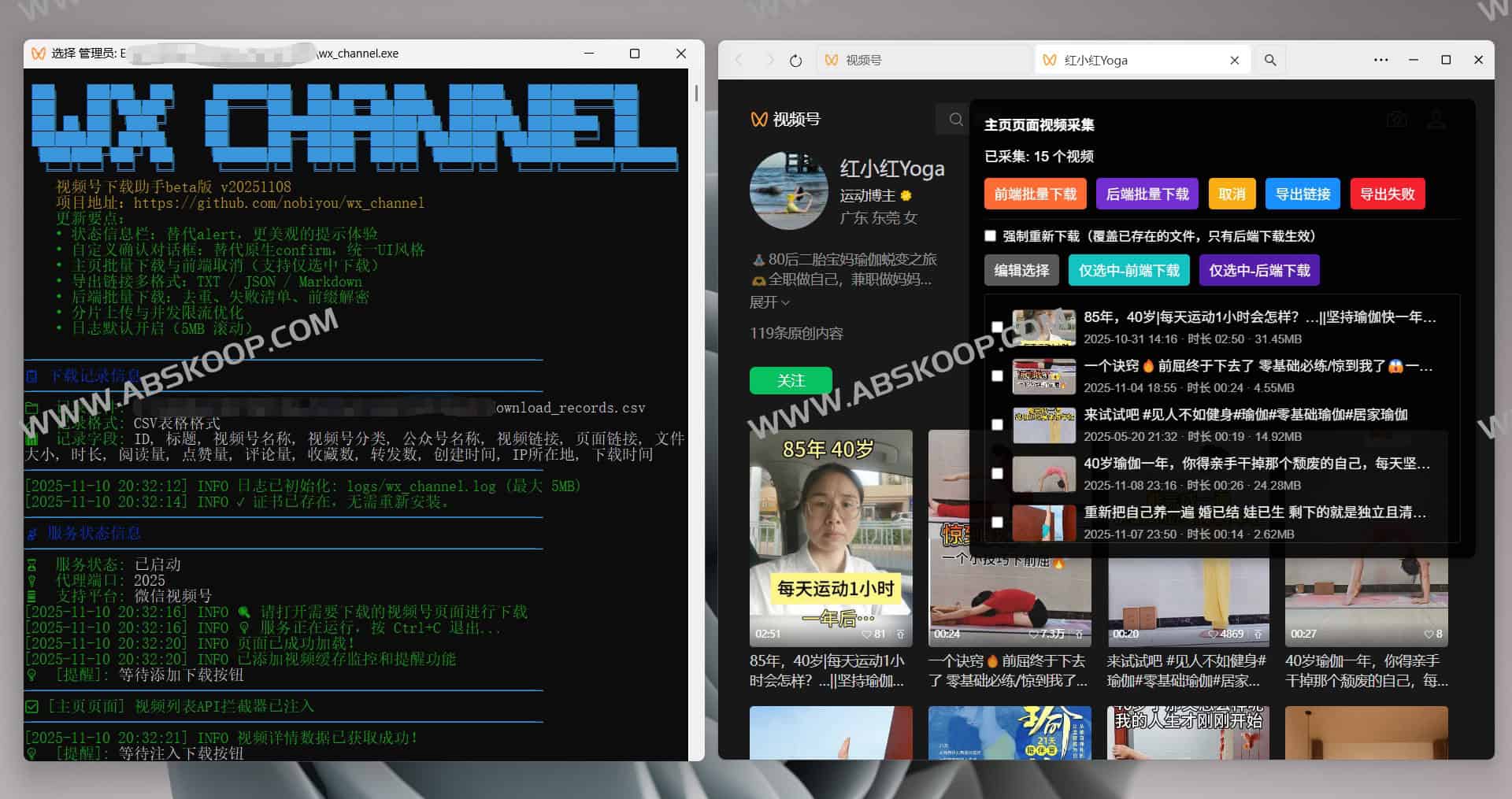
核心功能亮点
- 高效采集:支持单个、批量及全量选择下载,且具备智能去重功能,避免重复占用带宽与存储。
- 稳定传输 :针对大文件采用分片上传技术,支持 断点续传,确保下载过程稳健。
- Automated management Video files are ordered by 作者 自动分类存储,下载记录实时同步至 CSV 文件,方便后续检索与归档。
- 灵活导出:支持将采集到的视频链接导出为 TXT, JSON, or Markdown 格式。
- Easy deployment:内置自动脚本注入机制,无需手动安装插件,且支持滚动日志系统,便于快速排查问题。
- 特殊处理 :在 获得合法授权 的前提下,该工具能够处理加密的受保护内容。
环境要求
- 操作系统:Windows 10 及以上版本
- Operating environment:仅在源码编译时需要 Go 1.23+
- 浏览器:微信浏览器
- 网络权限 :需能正常访问视频号页面;建议以 管理员身份 运行程序以确保根证书自动安装成功。
安装与配置指南
方案一:直接使用预编译版本(推荐)
- 从 夸克网盘 或 GitHub Releases 下载适配系统的版本。
- Extract the compressed file to any local directory.
- 双击运行可执行文件(.exe)。
Option 2: Compile the code yourself from source.
git clone https://github.com/nobiyou/wx_channel.git cd wx_channel # 标准编译 go build -o wx_channel.exe # 压缩体积编译(推荐)go build -ldflags='-s -w' -o wx_channel_mini.exe 快速上手步骤
- 启动服务:运行
wx_channel.exe。 - 配置代理:将浏览器的 HTTP 代理设置为
127.0.0.1:2025(推荐使用 SwitchyOmega 插件进行快速切换)。 - 证书安装:首次运行程序会自动尝试安装根证书。若安装失败,请手动安装
downloads/SunnyRoot.cer,然后刷新视频号页面。 - 开始下载:访问微信视频号,通过页面上自动出现的注入面板选择需要下载的内容。
进阶配置
命令行参数
wx_channel.exe --help # 查看完整帮助 wx_channel.exe -v, --version # 查看当前版本 wx_channel.exe -p, --port < 端口 > # 修改代理端口(默认 2025)wx_channel.exe --uninstall # 卸载已安装的根证书 Environment variable configuration
可通过设置环境变量来精细化控制程序行为:
# 基础配置 WX_CHANNEL_PORT=2025 WX_CHANNEL_DOWNLOADS_DIR=downloads # 安全与访问控制 WX_CHANNEL_TOKEN=your_secret_token WX_CHANNEL_ALLOWED_ORIGINS=https://example.com # 日志与性能优化 WX_CHANNEL_LOG_FILE=logs/wx_channel.log WX_CHANNEL_LOG_MAX_MB=5 WX_CHANNEL_UPLOAD_CHUNK_CONCURRENCY=4 WX_CHANNEL_DOWNLOAD_CONCURRENCY=2 工作原理分析
- 流量拦截 $rightarrow$ 本地 HTTP 代理截获微信浏览器的请求。
- 动态注入 $rightarrow$ 在响应页面中自动植入 JavaScript 控制面板。
- Data Interaction $rightarrow$ 前端面板采集视频元数据并通过 API 传输至本地服务。
- Local persistence $rightarrow$ 服务端将视频按作者分类存储,并同步更新 CSV 记录表。
Resource Links
开源地址: https://github.com/nobiyou/wx_channel
快速下载: 夸克网盘下载
End of text
