PrinterService:让局域网打印摆脱设备限制
PrinterService is an open-source project. lan-printing 开发的内网打印增强工具。它将复杂的打印机配置简化为简单的 Web 界面,用户无需在每台设备上安装驱动,只需通过浏览器上传文件,即可调用局域网内的打印机完成输出。
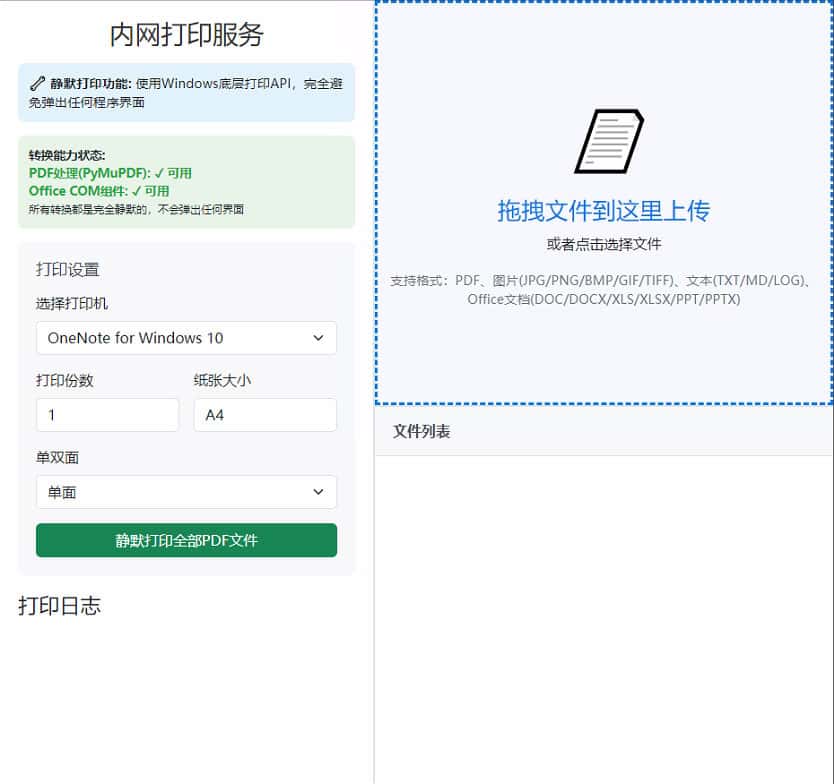
Core Functions
- 跨平台 Web 访问:提供轻量化网页界面,手机、平板或任何电脑通过浏览器即可访问,无需安装客户端。
- 全自动 PDF 转换Built-in conversion mechanism to convert mainstream formats such as Word, Excel, PPT, TXT and images into PDF for printing, ensuring consistent layout.
- 高效文件管理:支持拖拽上传,并提供预览、查看源文件及删除等管理操作。
- 静默后台运行:程序启动后自动收缩至系统托盘,不干扰日常办公。
部署与使用指南
1. 适用环境
- 软件依赖:宿主电脑必须安装 Microsoft Office(用于文件格式转换)。
- 硬件连接:宿主电脑需已正确安装打印机驱动并能正常打印。
- 网络要求:所有访问设备与宿主电脑处于同一局域网且网络稳定。
2. 操作流程
- 启动服务:运行 PrinterService 程序,确认系统右下角托盘出现打印机图标。
- 获取地址:右键点击托盘图标,复制显示的访问地址。
- 执行打印 Enter this address in your browser, drag the document you want to print into the webpage, and the system will complete the process automatically.
文件 → PDF → 打印机的流程。
支持的文件格式
| 类别 | Supported formats | 处理方式 |
|---|---|---|
| 文档 / 文本 | .doc, .docx, .pdf, .txt, .md, .log | 自动转 PDF |
| 表格 / 演示 | .xls, .xlsx, .ppt, .pptx | 自动转 PDF |
| 图像 | .jpg, .png, .gif | 自动转 PDF |
Version Update Highlights
- 交互升级:优化拖拽上传体验,新增文件管理面板,支持实时预览与源文件追溯。
- 性能优化:移除冗余资源,支持单文件离线运行,不再依赖外部网络。
- 存储管理:优化日志系统,在保留打印记录的同时,实现临时文件的智能清理。
Resource Acquisition
📎 GitHub 项目地址:https://github.com/cp9no1/PrinterService
End of text
