
What is an Immich?
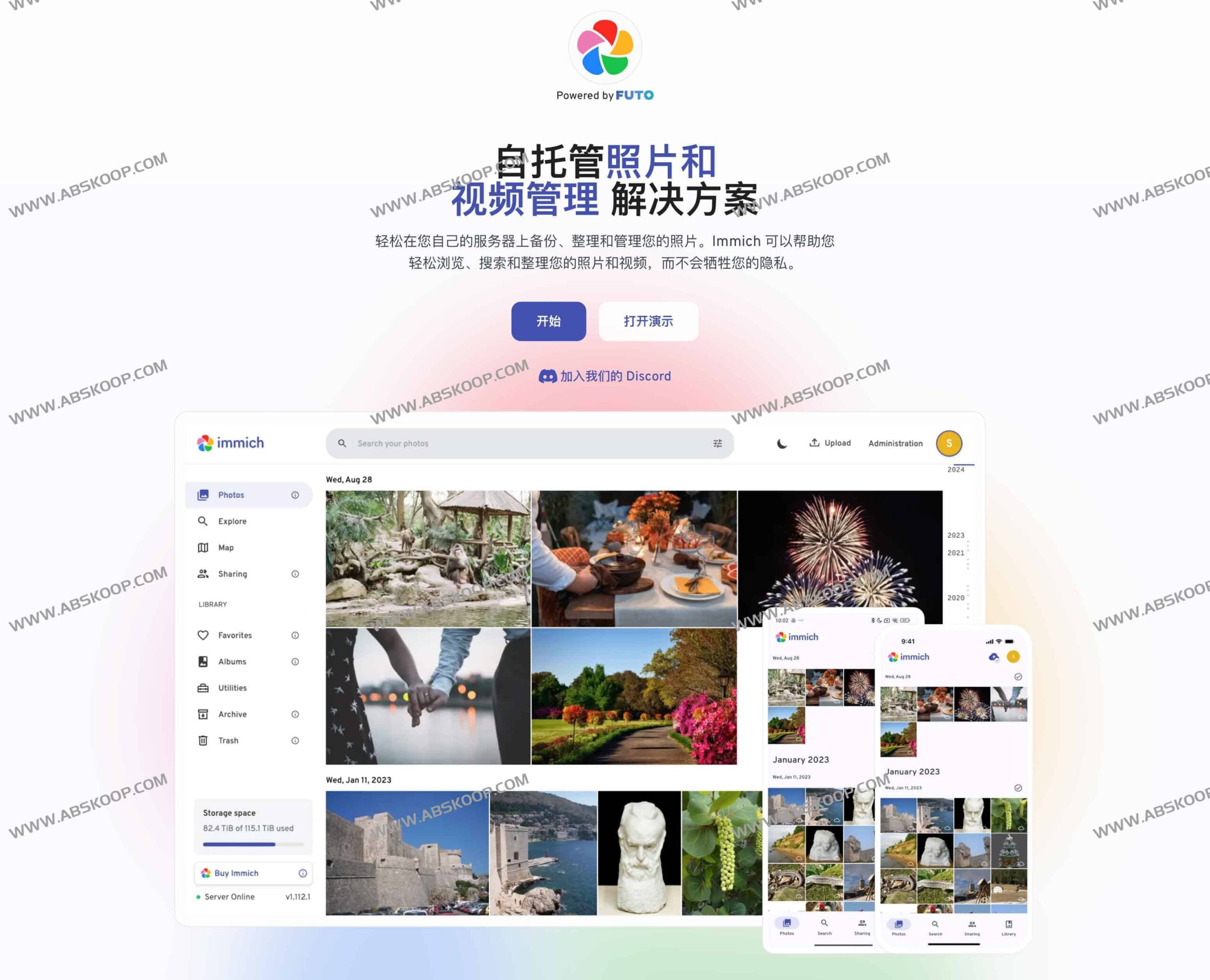
Immich 是一款专注于隐私保护的自托管照片与视频管理系统。它允许用户在自己的服务器上构建私有云相册,实现多媒体资源的自主备份、高效整理与流畅浏览。该项目目前处于活跃开发状态,凭借其强大的功能,非常适合作为个人或团队的辅助存储方案(建议配合其他冷备份手段使用,而非将其作为唯一数据备份渠道)。
Users can obtain server-side components and clients through the official website or GitHub, seamlessly connecting mobile devices, web applications, and the server to build a fully controlled centralized management system.
Addressing core pain points
- Complete privacy control All data is stored on local servers or in a private cloud, eliminating the need to upload sensitive photos to third-party platforms.
- Extreme response speed The new version adopts the Rust and NestJS architecture to ensure fast thumbnail generation and smooth timeline scrolling. It also has a significant improvement in the efficiency of scanning external libraries.
- Experience synchronized across all platforms The operation logic is highly unified across iOS, Android, and Web platforms, and it supports flexible automatic backup in the foreground and background.
Detailed explanation of features
1. Intelligent backup and multi-device synchronization
- Fine-grained backup It supports selecting backup content by album or folder, and the system will automatically ignore duplicate files, effectively saving storage space.
- Flexible integration :提供 OAuth 登录与 API Key 机制,方便第三方工具或自动化脚本进行安全备份。
2. Deep Search and AI Organization
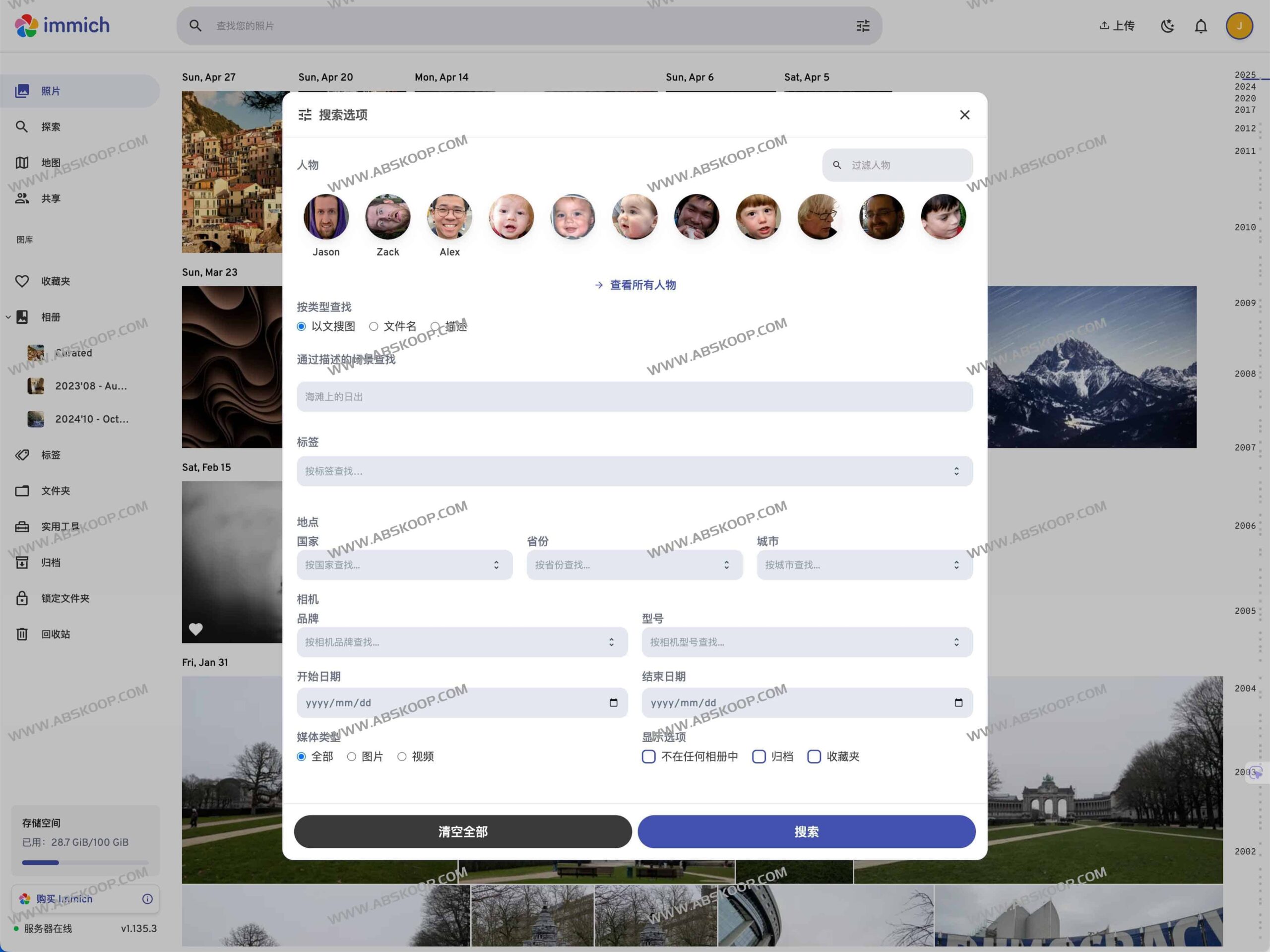
- Multidimensional screening It allows for one-click filtering based on location, date, object, tags, and album, and supports multi-condition combined search.
- AI facial recognition It uses AI to automatically cluster and group people, and supports manual naming and batch labeling.
- Precise object detection The integration of the Typesense search engine significantly improves the accuracy and response speed of tag retrieval.
- Professional format support It natively supports RAW format preview, and 360° panoramic photos can be viewed directly on the web.
3. Secure collaboration and sharing
- Controllable permissions :可创建共享或只读相册,生成的外部链接支持设置失效日期。
- Multi-user isolation The same instance supports multiple independent spaces for users, which can meet the privacy needs of family members, as well as be displayed through a public gallery.
Functional Comparison Matrix
| Features | Mobile | Web version |
|---|---|---|
| 照片 / 视频上传与查看 | yes | yes |
| Automatic backup during runtime | yes | N/A |
| Duplicate item deduplication | yes | yes |
| Specify backup album | yes | N/A |
| Local download resources | yes | yes |
| 多用户支持 | yes | yes |
| Photo albums and shared photo albums | yes | yes |
| fast scroll bar | yes | yes |
| RAW format support | yes | yes |
| Metadata view (EXIF/map) | yes | yes |
| Multidimensional search (face/object/tag) | yes | yes |
| User management functions | no | yes |
| Silent background backup | yes | N/A |
| Virtual scrolling optimization | yes | yes |
| OAuth authentication | yes | yes |
| API Keys Management | N/A | yes |
| Live Photos | yes | yes |
| 360° panoramic display | no | yes |
| Custom storage structure | yes | yes |
| 公共分享 | yes | yes |
| 归档与收藏 | yes | yes |
| 足迹地图 | yes | yes |
| 好友分享 | yes | yes |
| 人脸识别分组 | yes | yes |
| 回忆(那年今日) | yes | yes |
| 离线支持 | yes | no |
| 只读相册 | yes | yes |
| 照片堆叠 | yes | yes |
| 标签管理 | no | yes |
| 文件夹浏览 | no | yes |
部署与维护指南
- 环境搭建 :推荐使用官方 Docker Compose 模板快速部署。硬件建议配置 4GB 以上内存及 x86-64 CPU;若要加速 AI 人脸与对象分析,建议启用 GPU 或 Coral 加速卡。
- 升级策略 :由于项目迭代速度快,建议在生产环境更新前先在测试环境验证,并务必保留完整的冷备份。
- 安全加固 :建议部署 HTTPS 反向代理并限制不必要的端口开放,定期更新 API Key 和 OAuth 密钥。
适用场景
- 家庭影像中心 :自动汇总全家成员设备的照片,方便长辈通过 Web 端回顾生活点滴。
- 专业摄影工作流 :利用 RAW 支持与自定义文件夹模板高效归档素材,并通过安全链接向客户分享选片。
- 企业素材库 :通过对象检索和目录化管理快速定位项目素材,确保敏感数据不外流。
资源链接
如果你希望摆脱公有云的订阅费用并消除数据泄露风险,Immich 是一个极佳的选择。请记住,在享受自托管便利的同时,养成多副本备份的习惯,才能确保记忆永不丢失。
下载地址: 网盘下载
官方网站: https://Immich.app/
在线演示: https://demo.Immich.app/
GitHub 仓库: https://github.com/Immich-app/Immich
正文完
